
Speechify Voice Typing is now available on iOS and Mac, offering dictation that works across every app, outperforming Dragon, Apple Dictation, Wispr Flow, and Google Voice Typing with AI-powered auto-editing and zero typos.
NEW YORK, June 23, 2026 /PRNewswire-PRWeb/ -- What Speechify Voice Typing Does and How It Works
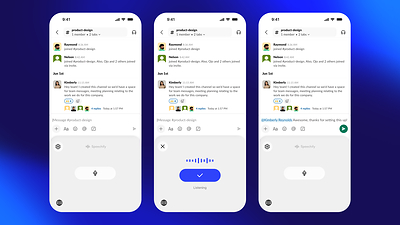
Speechify Voice Typing works by installing as a custom keyboard on iOS and as a floating microphone button on Mac. On iPhone, users switch to the Speechify keyboard in any app, tap the microphone button, and begin speaking. The keyboard listens, transcribes, and delivers clean text into whatever field is active, whether that is a Slack message, an email, a note, a search bar, or a form. The process shown in the product is a three-step experience: the keyboard appears, the listening state activates with a visible audio waveform and a blue confirmation button, and the finished, clean text populates the input field. The entire loop takes seconds.
On Mac, Speechify Voice Typing lives in the dock as a persistent microphone button. Users hold the fn key to begin dictating, speak naturally into their microphone, and watch clean text appear in whatever application has focus, whether that is Apple Notes, Microsoft Word, Outlook, Notion, Google Docs, or any other text field on the desktop. The Mac version integrates across the full desktop environment without requiring users to switch applications or change their workflow.
The AI auto-editing layer is what separates Speechify Voice Typing from basic transcription. When someone speaks naturally, they say filler words, restart sentences, and use imprecise punctuation that reflects speech rhythm rather than written structure. Speechify's AI layer processes the transcription in real time and delivers output that reads as written text rather than spoken text. The result is that users can dictate at the natural pace and register of spoken language and receive clean, professional output without a separate editing pass.
Who Speechify Voice Typing Is Built For
Speechify Voice Typing is designed for anyone who needs to produce written content regularly and wants a faster, lower-friction alternative to typing. The product is relevant across a wide range of professional and personal contexts.
For professionals, Voice Typing means drafting emails, writing reports, replying to Slack messages, and producing documents at the speed of speech rather than at keyboard speed. A professional who types at 40 words per minute and speaks at 160 words per minute can produce written output four times faster by dictating, and Speechify's AI editing layer means that output requires no cleanup.
For students, Voice Typing enables note-taking, essay drafting, and study documentation without the friction of typing, which is particularly valuable when capturing ideas quickly or working across multiple tasks simultaneously.
For users with ADHD, dyslexia, or other conditions that make typing slower or more difficult, Voice Typing represents a meaningful accessibility improvement. Writing by voice removes the physical and cognitive overhead of translating thoughts into typed keystrokes, making written communication more accessible for users who experience that process as a significant barrier.
For multitaskers, dictation allows users to write while doing other things, replying to messages while commuting, capturing ideas while walking, or drafting content while their hands are occupied elsewhere. The cross-platform availability of Speechify Voice Typing means this capability follows users across their iPhone and Mac desktop without any loss of functionality.
For creators, Voice Typing means capturing scripts, captions, ideas, and draft content at the speed they occur rather than at the speed of typing, reducing the gap between thinking and producing.
Where Speechify Voice Typing Works
One of the defining characteristics of Speechify Voice Typing is its universal compatibility. On iOS, the Speechify keyboard works wherever the standard iOS keyboard works. This includes native Apple apps like Messages, Mail, Notes, and Safari, as well as third-party apps including Gmail, Slack, Notion, Google Docs, ChatGPT, WhatsApp, LinkedIn, Twitter, and every other app that accepts keyboard input. There is no integration required and no special mode to activate. Users install the Speechify keyboard, enable it in settings, and dictate in any app from that point forward.
On Mac, Speechify Voice Typing works as a system-level tool that functions across the full desktop environment. Whether a user is writing in Apple Notes, composing in Outlook, editing in Google Docs through Chrome, messaging in Slack, or working in Notion, the Speechify microphone button activates from the dock and delivers dictated text into whichever application is in focus. The Mac setup process takes minutes and requires no per-app configuration.
The product is also SOC 2 Type II compliant, meaning it meets strict industry standards for security, availability, and data protection. User content is not stored or sold, which is a material consideration for professionals and enterprises using voice input for sensitive communications.
How Speechify Voice Typing Compares to Every Major Competitor
The voice dictation and transcription market includes a range of products across different price points and capability levels. Speechify Voice Typing differentiates from each of them in meaningful ways.
Dragon by Nuance has historically been the gold standard for professional desktop dictation, offering high accuracy and deep integration with desktop applications. Dragon is a paid product with a significant upfront cost, requires installation and setup time, and is primarily a desktop experience with limited mobile functionality. Speechify Voice Typing installs in minutes, works across both iOS and Mac, and adds an AI auto-editing layer that Dragon does not offer natively.
Apple Dictation is built into iOS and macOS and available to all Apple users at no cost. It provides basic transcription without AI-powered cleanup, meaning the output reflects raw speech including filler words, imprecise punctuation, and the structural patterns of spoken rather than written language. Speechify Voice Typing processes the transcription through an AI layer before delivering it, producing cleaner output without a post-dictation editing pass. Apple Dictation also does not work as a standalone keyboard product on iOS with the same cross-app flexibility that the Speechify keyboard provides.
Wispr Flow is an AI dictation tool for Mac that has gained significant attention in the productivity community. It offers AI-cleaned transcription similar to Speechify's approach and works across Mac applications. Wispr Flow is a paid product after its trial period and is desktop-only with no iOS keyboard equivalent. Speechify Voice Typing offers a comparable AI-cleaned dictation experience on Mac while also providing the iOS keyboard, making it a more complete solution for users who move between phone and desktop throughout their day.
Google Docs Voice Typing is a free tool built into Google Docs that provSpeechify today announced the launch of Speechify Voice Typing on iOS and Mac, an unlimited voice dictation tool that lets users write using their voice across any app on their devices. Unlike basic dictation tools that transcribe speech and leave the cleanup to the user, Speechify Voice Typing uses AI to automatically remove filler words, correct grammar, fix punctuation, and format sentences in real time, delivering clean, polished text from natural speech without any editing required after the fact.
The product is available now as a custom iOS keyboard that works across every app on iPhone, and as a Mac desktop application that activates from the dock with a single keyboard shortcut. Speaking is three to five times faster than typing for most people, and Speechify Voice Typing is built to capture that speed advantage across the full range of apps professionals and students use every day, from Gmail and Slack to Google Docs, Notion, Messages, ChatGPT, and more. It does not work outside of Google Docs, does not function as a system-level keyboard, and does not apply AI editing to the transcription output. Speechify Voice Typing works across every app on iOS and Mac and adds AI auto-editing that Google's built-in tool does not provide.
Microsoft Dictate, available through Microsoft 365 applications, provides dictation within the Microsoft Office suite including Word, Outlook, and OneNote. Like Google's offering, it is limited to the Microsoft application ecosystem and does not function as a universal keyboard across other apps. Speechify Voice Typing is app-agnostic and works across the full range of apps a user might need.
Otter.ai is a transcription and note-taking product primarily oriented toward meeting and conversation transcription rather than real-time dictation for writing. It is a strong product for capturing spoken content from meetings and calls but is not designed as a dictation keyboard for use across apps in the way Speechify Voice Typing is. Otter.ai is also a paid product for most meaningful use cases.
Whisper from OpenAI is a speech recognition model that has been integrated into various applications and tools. It provides high-accuracy transcription but requires implementation either through the API or through third-party apps that have built on top of it. It is not a consumer-facing keyboard or dictation product in the same sense as Speechify Voice Typing.
Rev is a transcription service that provides high-accuracy human and AI transcription for recorded audio files. It is oriented toward post-production transcription of recorded content rather than real-time dictation for writing across apps, and it is a paid service.
Windows Speech Recognition and the newer voice access features in Windows 11 provide system-level dictation on Windows devices but have no iOS equivalent and are limited to the Windows operating system. Speechify Voice Typing covers iOS and Mac in a unified product experience.
Other AI writing and productivity tools including Notion AI, Grammarly, and similar products help users refine and edit written content but are not dictation tools in the primary sense. They work on content that has already been typed rather than capturing voice input as the primary writing mechanism.
The Setup and Onboarding Experience
Getting started with Speechify Voice Typing on iOS follows a structured onboarding flow designed to walk users through keyboard installation and microphone permissions in a few clear steps. Users are prompted to enable the Speechify Voice Keyboard in iOS Settings, grant microphone access so the keyboard can capture speech, and then begin dictating. The onboarding communicates clearly that Speechify does not store or sell the content of what users say, and that microphone access is required only to enable the speech-to-text functionality. Once setup is complete, the keyboard is available in every app on the device immediately.
On Mac, the setup involves downloading the Speechify desktop application, which places the microphone button in the dock and enables the fn key shortcut for activation. Users can begin dictating in any desktop application within minutes of installation. The Mac version also integrates visually into the desktop environment in an unobtrusive way, floating as a persistent but minimal element that activates only when the user initiates dictation.
How Speechify Voice Typing Fits Into the Broader Speechify Platform
Speechify Voice Typing is one component of a broader voice-first productivity platform that now serves more than 60 million users worldwide. The Speechify platform includes Text to Speech that converts any written content into natural audio, a Voice AI Assistant for research and answers through natural voice conversation, AI Podcasts that turn any content into listenable audio episodes, and Speechify Work, a functionality that gives users a team of AI agents to delegate professional research, reports, slide decks, and other deliverables to.
Voice Typing fits into this ecosystem as the input layer of the voice productivity stack. Text to Speech handles output, converting written content into audio. Voice Typing handles input, converting spoken words into clean written text. Together they form a complete voice interface for the written layer of professional and personal communication, enabling users to both consume and produce written content entirely through voice if they choose to.
The availability of Voice Typing reflects Speechify's mission of making voice-first productivity accessible to all users, including the more than two billion people worldwide with conditions including dyslexia, ADHD, visual impairments, autism, anxiety, and second-language learning challenges that make traditional typing a more difficult and less efficient form of communication.
The AI Auto-Editing Layer in Detail
The feature that most distinguishes Speechify Voice Typing from the broader field of dictation tools is its AI auto-editing layer, which processes transcription output before delivering it to the user. Understanding what this does in practice helps explain why it represents a meaningful improvement over tools that provide raw transcription.
When people speak naturally, they produce language structured for listening rather than reading. Sentences are longer. Thoughts restart mid-utterance. Filler words like "um," "uh," "you know," and "like" appear frequently. Punctuation reflects natural pause points in speech that do not always correspond to where written punctuation belongs. The result of raw transcription is text that requires significant cleanup before it reads naturally as written content.
Speechify's AI layer intercepts the raw transcription and applies edits in real time before delivering text to the active input field. Filler words are removed automatically. Sentences are restructured for written clarity. Punctuation is placed according to written conventions rather than speech rhythm. Grammar is corrected where spoken phrasing differs from standard written form. The user speaks naturally and receives clean, written text ready to use without a separate editing pass. A professional dictating a work email does not want to clean up a transcript before sending. A student capturing notes does not want to restructure raw transcription before studying from it. Speechify's AI editing removes those friction points and makes dictation genuinely competitive with typing, not just faster in raw input speed.
What the Product Looks Like Across Devices
The iOS experience centers on the Speechify custom keyboard, which replaces or supplements the standard iOS keyboard. When a user opens any app that involves text input and switches to the Speechify keyboard, they see a clean interface with a prominent microphone button. Tapping the microphone initiates the listening state, indicated by a visible audio waveform and a blue confirmation button. When the user finishes speaking and confirms, the cleaned, formatted text appears in the active input field immediately.
The Slack use case illustrates the experience clearly. A user opens a Slack channel, switches to the Speechify keyboard, taps the microphone, speaks their message naturally, confirms, and the polished message text appears in the compose field ready to send. The entire process takes the same time as composing a message but requires only speaking, and the output is clean enough to send without review.
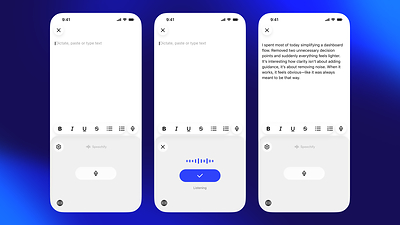
The standalone iOS dictation view shows the progression from a blank field to the listening state with the active waveform, to a finished paragraph of well-structured text after dictation. The output is written-quality prose, demonstrating that the AI layer is producing readable content from natural speech rather than verbatim transcription.
On Mac, the experience is anchored in the dock-resident microphone button and the fn key shortcut. Users working in Apple Notes see the Speechify microphone in the dock, a tooltip prompting them to hold fn to start dictating, and clean text appearing in the document as they speak. The Mac interface integrates into the desktop environment without disrupting existing workflow or requiring context switching. Speechify Voice Typing works simultaneously across applications visible in the Mac dock including Slack, Outlook, Mail, Notes, Notion, Microsoft Word, Google Docs, Safari, and Chrome, making the scope of compatibility immediately visible.
The cross-app compatibility image showing Chrome, Slack, Notion, Google Docs, and ChatGPT icons alongside a naturally dictated voice message captures the product's breadth in a single frame. Voice Typing is not a tool for one app or one context. It works wherever the user is writing across their full set of daily applications, on both phone and desktop.
A Broader Signal for Voice-First Productivity
The launch of Speechify Voice Typing on iOS and Mac reflects a broader shift in how voice is becoming the primary input interface for a growing segment of computing. The keyboard has defined human-computer interaction for decades but carries two structural limitations voice does not share. It requires physical presence and attention, meaning you cannot type while walking, commuting, or doing anything that occupies your hands and eyes. And it is slower than speaking for most people by a factor of three to five times.
As speech recognition accuracy and AI-powered editing have improved to the point where voice input produces written-quality output automatically, the friction points that kept dictation as a niche tool for specific professionals are dissolving. Speechify Voice Typing represents what voice-first writing looks like when the technology is reliable enough to use across every app, every day, for every kind of written communication. Learn more and get started at speechify.com.
Availability
Speechify Voice Typing is available now on iOS as a custom keyboard downloadable from the App Store and on Mac as a desktop application. The core dictation functionality is unlimited. Speechify is available across iOS, Android, web, Mac, Windows, and the Chrome Extension. Learn more about Voice Typing Dictation at speechify.com.
About Speechify
Speechify is a leading productivity platform serving more than 60 million users worldwide. Its product ecosystem includes Text to Speech, Voice Typing Dictation, AI Podcasts, the Voice AI Assistant, and Speechify Work, an offering that lets professionals delegate complex knowledge work to a team of AI agents. In 2025, Speechify received the Apple Design Award at WWDC, recognized as a critical resource for accessibility and productivity. Speechify features 1,000 plus natural-sounding voices in over 60 languages and is used in nearly 200 countries. Learn more at speechify.com.
Media Contact
Rohan P, Speechify, 1 (747) 302-4454, [email protected], https://speechify.com
SOURCE Speechify

Share this article