VideoUpscaler now combines Full HD cloud video enhancement with free browser tools for trimming, resizing, compressing, converting, and other everyday video tasks. AI enhancement runs in the cloud, while supported utility tools process media locally and keep source files on the device.
HONG KONG, Sept. 15, 2026 /PRNewswire-PRWeb/ -- VideoUpscaler today announced an expanded web video toolkit at https://videoupscaler.com. The updated service brings its AI Video Upscaler together with free, no-sign-up browser tools for people who need to upscale video online, prepare shorter clips, change formats, or handle common editing tasks without installing a desktop application.
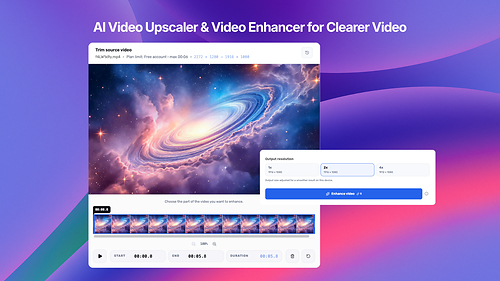
The cloud Video Upscaler supports 1x enhancement at the source frame size, along with 2x and 4x enlargement. Users can select the part of a recording they want to process on a trim timeline before submitting it. The workspace displays the expected output dimensions and estimated credit use in advance, then delivers the completed result as a separate MP4 file.
Output is capped at Full HD dimensions according to video orientation. Landscape video can reach 1920 × 1080, portrait video can reach 1080 × 1920, and square video can reach 1080 × 1080. The service applies the requested scale within those limits, so a 4x selection may produce a smaller result than 4K. The displayed dimensions account for the limit before processing begins.
Free accounts receive 30 cloud credits each month and can submit clips up to six seconds long for AI enhancement. Paid Premium and Business plans provide larger monthly credit balances, longer duration limits, and priority processing. Cloud work continues after a task has been submitted, and completed videos appear in account history, so the processing page does not need to remain open. One cloud enhancement can be queued or processed per account at a time.
VideoUpscaler also includes free browser-based video tools. The collection covers trimming, splitting, merging, cropping, compressing, and resizing video. Other tools rotate or flip footage, remove sound, extract audio or frames, change playback speed, adjust volume and frame rate, create loops, reverse clips, and convert between commonly used containers such as MP4, WebM, MOV, MKV, and TS. Dedicated Video to GIF and GIF to Video workflows are also available.
These utility tools process supported media locally in the browser and do not submit source files to the cloud video enhancement queue. The media work remains on the device, similar to an offline video utility. The website still requires an internet connection to load. Processing depends on the codecs, memory, and encoding features available in the browser, and larger or longer files may require more time and device resources.
Cloud enhancement follows a separate workflow because the AI model runs on VideoUpscaler's processing infrastructure. The selected clip is prepared in the browser and uploaded for processing. Uploaded source videos and processed results are removed within four hours, so completed files should be downloaded during that window. The original file on the user's device remains unchanged.
The site separates enhancement, resizing, and compression into distinct workflows. AI enhancement works on the appearance of existing footage and can enlarge the frame. Resizing changes the output dimensions for a destination such as a social platform, while compression reduces the amount of data used by the file and may trade some visual detail for a smaller download.
Media Contact
Tong Zhang, Sparklightforce Limited, 86 44260976, [email protected]
SOURCE VideoUpscaler

Share this article